A tasty introduction
Imagine you’re building a hot new recipe app that suddenly goes viral because of your revolutionary new tagine recipe. Your server is now bombarded with requests from thousands of hungry users desperately seeking the perfect tagine. Your database is sweating, your CPU is screaming “I CANT HANDLE THIS” and your cloud bill is climbing! Your application has become so slow that users have enough time to prepare couscous while waiting for the page to load.
Sounds familiar? (Maybe not the food part, but the performance crisis might ring a bell)
This is where caching enters the chat. Caching is like that efficient friend who remembers everyone’s coffee order so the whole group doesn’t have to recite their complicated requests every single time. In the world of computing, it’s a technique that stores frequently accessed data in a temporary location for quicker retrieval, saving your precious resources from doing the same work over and over again.
In this article, we’ll break down caching concepts into practical, actionable insights. We’ll explore when to use different caching techniques, how to implement them effectively. Whether you’re a junior developer trying to optimize your first production app or a seasoned engineer wanting to refresh your knowledge, this guide will give you the tools to make informed decisions about caching. So let’s dive in and demystify caching for mere mortals!
The Why: Benefits of Caching
Imagine if every time someone searched for your popular bastilla recipe, your server had to recalculate the preparation time, re-query the database for ingredients, and recompute the nutritional information. This is very inefficient, it’s like a chef forgetting to make pizza after every single customer! Caching aims to solve that.
Here’s what it brings to the table:
Fast response time: With cached data, your users get their recipe in milliseconds instead of seconds.
Dramatic reduction in server load: Your database was previously processing 5,000 identical queries per minute. With caching, that number drops to maybe 50.
Significant cost savings: Fewer server resources mean lower cloud bills.
Enhanced user experience: Studies show that users abandon websites that take more than 3 seconds to load. Caching helps keep your bounce rate low and your user satisfaction high.
Caching Fundamentals: The Building Blocks
Why it’s effective: Memory vs Disk:
Now that we understand why caching is useful, let’s break down how it works.
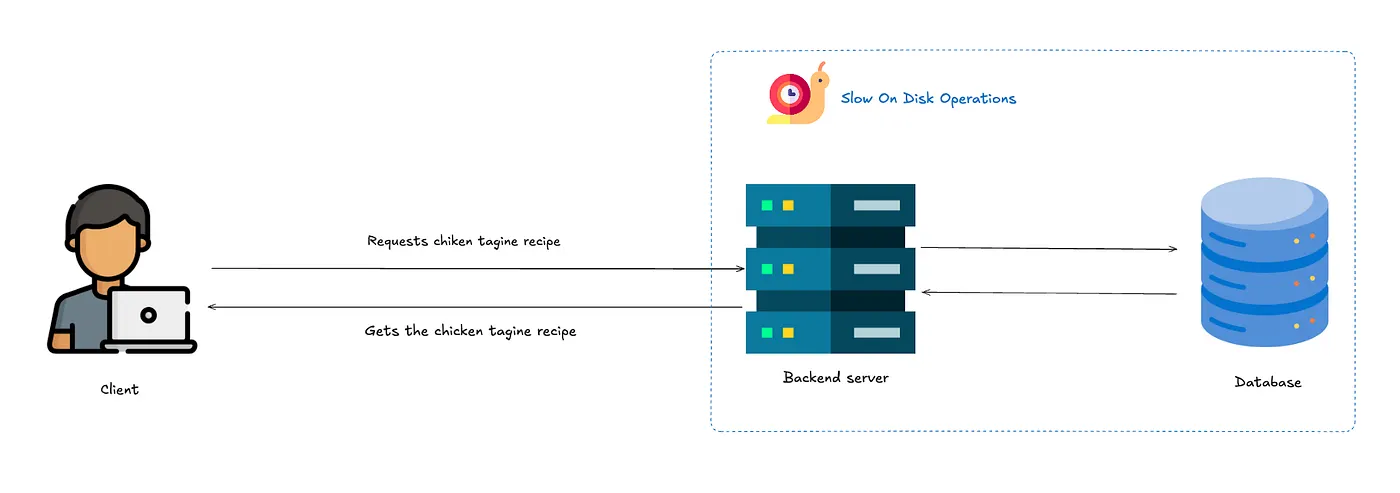
Here’s your app without caching
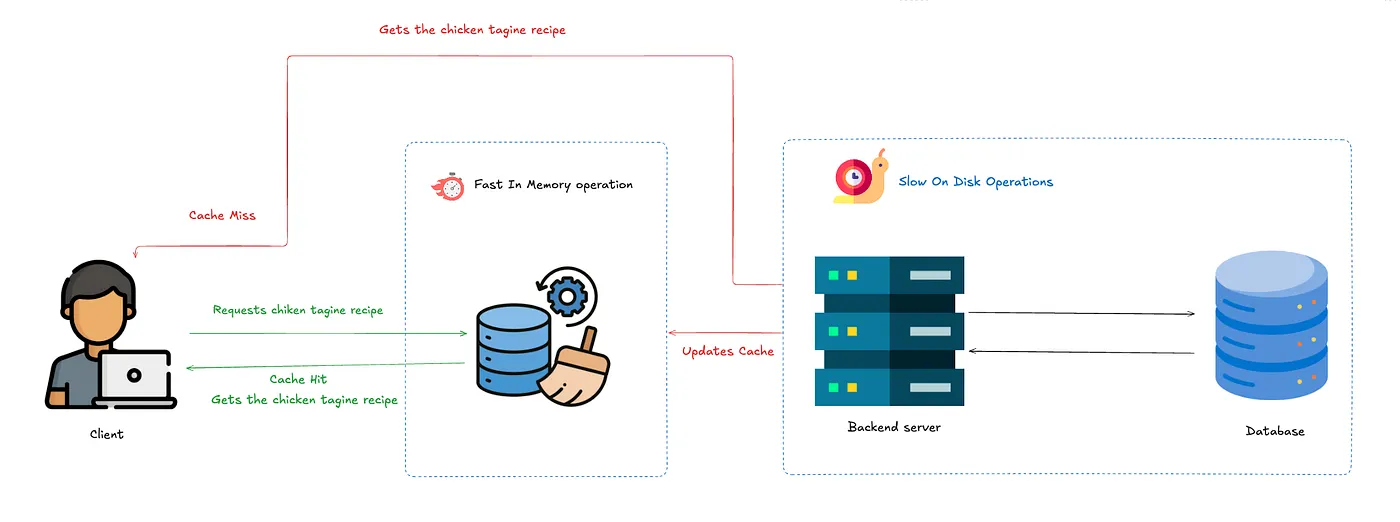
Here’s your app with caching enabled
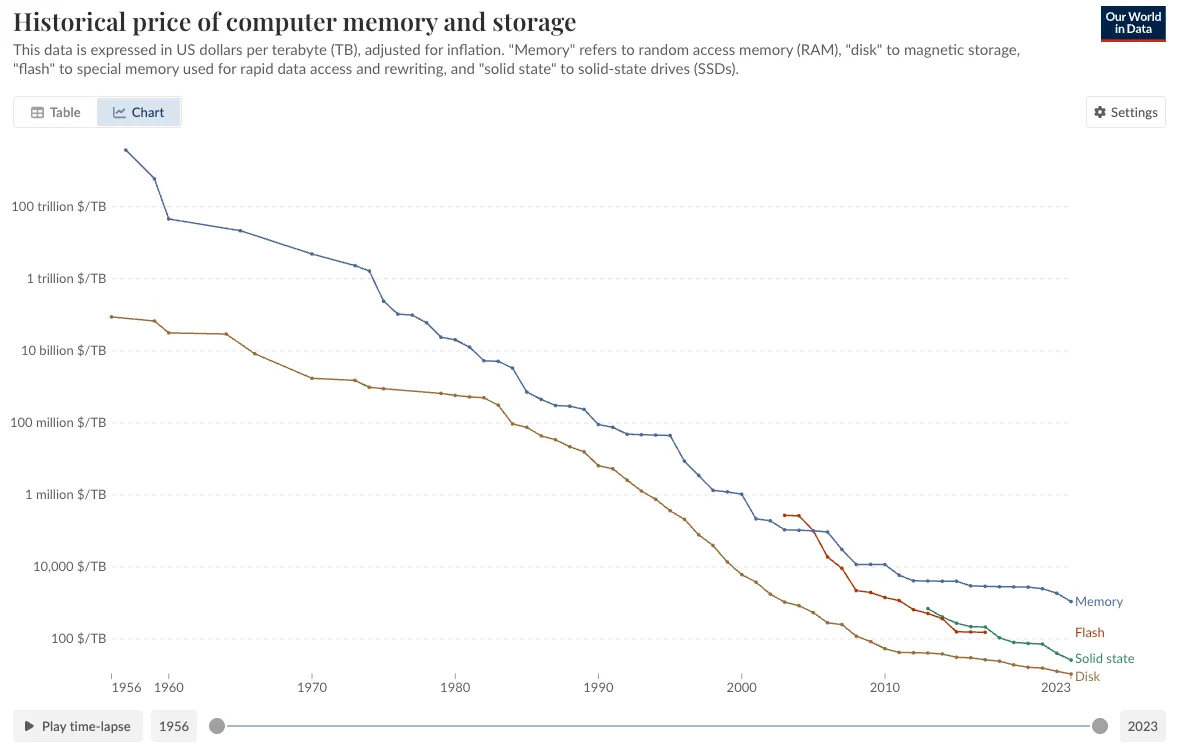
One fundamental point is that caching is faster because memory (RAM) is way faster than Disk (HDD or SSD), but the tradeoff is that RAM is way more expensive
Cache Hit vs. Cache Miss:
Let’s continue explaining how it works,
When your application looks for data in the cache, one of two things happens:
- Cache Hit: “Eureka! Found it!” Your app found what it needed in the cache. This is the equivalent of finding your keys exactly where you left them. The data is served immediately, and everyone’s happy.
- Cache Miss: “Uh-oh, not here.” The data isn’t in the cache, so your app has to take the scenic route to the database, fetch the data, store it in the cache for next time, and then return it and typically populate the cache so that next time we get a cache miss.
Cache Eviction: Making Room for New Stuff
Just like that milk that was perfect yesterday but is questionable today, cached data has a shelf life. Here are some strategies that you can apply when the cache is full.
- Least Recently Used (LRU): “Haven’t used that recipe in weeks? Out it goes.” Discards the least recently accessed items first when the cache is full.
- Least Frequently Used (LFU): “Nobody’s looking at the kale recipes anymore.” Tracks popularity and dumps the least frequently accessed items.
- First In, First Out (FIFO): “Oldest items exit first.” Simple but doesn’t account for item popularity.
Cache Invalidation: The Hard Part
There’s a famous quote in computer science: “There are only two hard things in Computer Science: cache invalidation and naming things.” Here are some popular strategies along with their use cases:
- Time-Based Expiration (TTL): “If it’s been here too long, it’s probably bad.” You put a timer on your cache entries. Once the clock runs out, they’re tossed. This works great for stuff like API responses or session tokens, where being a little out of date isn’t the end of the world. It’s super simple to set up , just tell the cache how long to keep things. The downside? You might end up serving stale data if something important changes before the timer runs out.
- Write-Through Cache: “If it’s important enough to save, it’s important enough to update.” Every time something gets written to your database, it also gets written to the cache right away. This keeps the two perfectly in sync, making it perfect for things like shopping carts or user profiles, where you want instant consistency. The catch is that it slows down your writes, because now you’re hitting two systems at once. Plus, if your cache ever goes down, you’re in for a bad day.
- Write-Around Cache: “Save it quietly. We’ll deal with it later.” When you update something, you skip the cache entirely and just hit the database. The cache only gets involved when someone tries to read the data later. This is great for write-heavy systems like logging apps, where most of the stuff written never gets looked at again. It keeps your cache cleaner, but the first read after a write is slower, because the cache has to scramble to catch up.
- Write-Back (Write-Behind) Cache: “We’ll get to it… eventually.” Instead of writing to the database right away, you dump the data into the cache first and let the cache figure out when to push it back to the database. This makes writes lightning-fast, which is ideal for things like collecting sensor data or heavy logging. Just be warned , if your cache crashes before syncing back to the database, your data could vanish into the void.
- Manual Invalidation: “You break it, you clean it.” When your app knows that something has changed, it takes responsibility and manually deletes or updates the cache entry. This is the go-to strategy for precision-demanding systems like content management platforms and real-time dashboards. It guarantees your cache always stays correct, but it also means you need tight, careful code.
- Event-Based (Pub-Sub) Invalidation: “Spread the word: it’s outdated!” Instead of manually trying to keep caches updated, you set up a system where any change to the data fires off an event. All the caches that care about that piece of data listen for the event and update themselves accordingly. This keeps things snappy and coordinated across huge distributed systems. Of course, now you have to run and monitor an event system, which can get complicated fast.
Deep dive into the LRU algorithm
Next up we will talk about one of the most popular eviction algorithms LRU from an architectural standpoint:
LRU (Least recently used) is pretty human if you think about it, if you don’t interact with a person for a long time, you tend to forget them. That’s basically how it works, when the cache is full, discard the latest recently accessed item.
To implement LRU effectively, we need two key operations to be fast:
- Retrieving an item by its key
- Tracking and updating the “recently used”
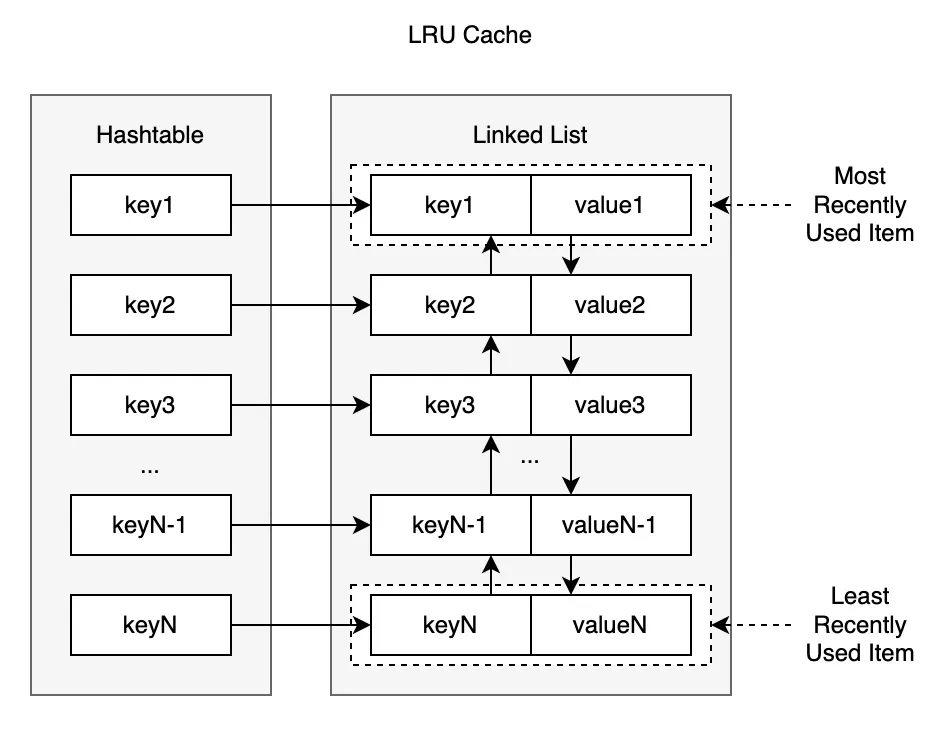
This creates an interesting challenge: Hash tables are great for key-based lookups (O(1) time) but don’t maintain order. Linked lists are perfect for maintaining and modifying order but terrible for lookups.
The solution? A hybrid approach using both:
- A hash map (dictionary) for O(1) lookups
- A doubly-linked list for tracking access order, the head of the list represents the most recently used item while the tail represents the least recently used item.
Process Flow
Accessing Data
When a cache entry is accessed, it gets moved to the most recently used position in the list (the head).
This ensures that the most frequently accessed items stay at the front, and the least frequently used items are pushed to the back.
Adding Data
When adding a new entry, it’s inserted at the most recently used position (the head).
If the cache has reached its capacity, the least recently used entry (the tail of the list) is evicted to make space.

Cache in the Real World: Redis and Memcached
In real production systems, you’re not usually hand-building your cache from scratch. Instead, you lean on powerful, battle-tested tools like Redis or Memcached.
Both Redis and Memcached are in-memory key-value stores used for caching, but they have slightly different philosophies:
- Memcached is a lightweight, pure caching layer. Think: simple key-value, no persistence, no rich data structures.
- Redis is an in-memory data structure store — it can cache, but it can also persist to disk, replicate data, and even act like a mini-database.
Conclusion
To sum up, caching reduces load and latency by keeping key data in fast memory instead of repeatedly hitting slower backends. Of course, caching is all about trade‑offs — you gain speed and cost savings at the expense of added complexity, memory use, and potential data staleness. We’ve covered cache hits versus misses, eviction policies (LRU, LFU, FIFO), invalidation methods (TTL, write‑through, pub‑sub), and real‑world tools like Redis and Memcached. Start by caching your heaviest queries with a simple cache‑aside pattern, then measure and refine for optimal performance. Thank you for reading, and hope this article has been insightful and useful to you.