Introduction:
If you’re building any kind of system, whether it’s a web app, a big data analysis dashboard, or an enterprise backend, you’ll eventually face this question: Where do I store my data?
This article will be your practical guide for navigation that choice. It’ll walk you through how to determine the right storage solution based on your data type, access patterns, and use case. It will also highlight real world tools as examples on how you would implement such storage solution from cloud providers like AWS, Azure, etc …
What’s the structure of your data?
The first and most critical question you must ask is what kind of data are we dealing with?
- Structured Data: Well-defined rows and columns. Think of tables with strict schemas. e.g., customer info, product inventories, financial transactions.
- Semi-structured Data: JSON, XML, YAML. Has structure but doesn’t fit neatly into columns.
- Unstructured Data: Images, videos, audio files, documents. No inherent structure.
If You Have Structured Data:
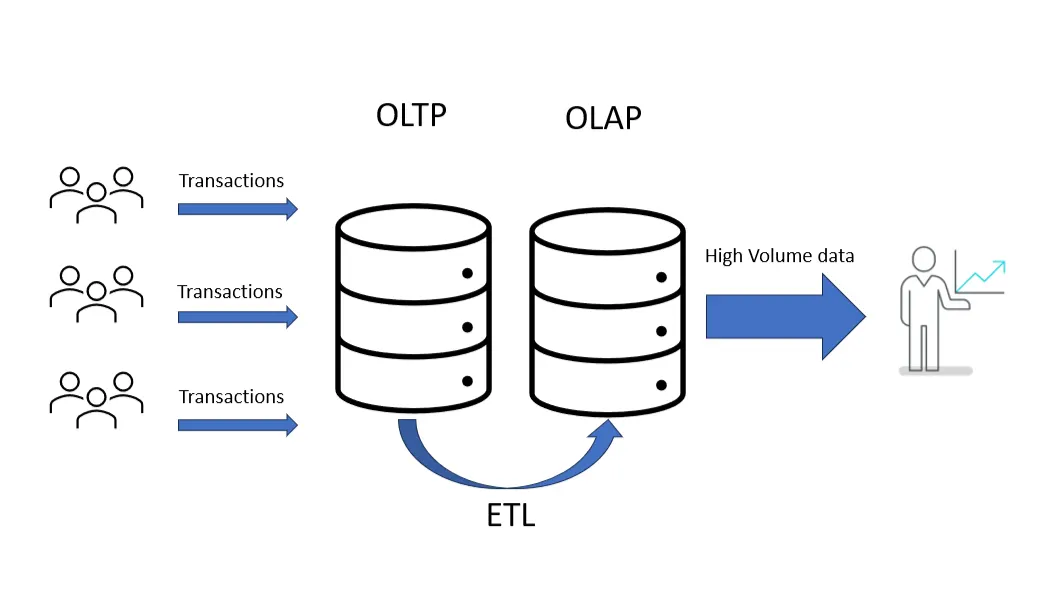
Use Case: OLTP (Online Transaction Processing)
If you’re building a web application or API where users are constantly interacting with the system — logging in, creating accounts, placing orders, updating settings, then you’re working in OLTP territory. These are read/write-heavy operations that need to be fast, reliable, and consistent.
Think about apps like an e-commerce platform where someone adds items to their cart and checks out, a social media platform where users update their profile…
In this case, it’s recommended to use a relational database. These are great at enforcing structure (schemas), ensuring consistency (ACID compliant), and handling concurrent operations safely.
Common cloud solutions you’d use here:
- AWS RDS (supports MySQL, PostgreSQL, etc.): great for managed production environments
- Azure SQL Database: scalable and integrates well if you’re in the Microsoft ecosystem
- Google Cloud SQL: pairs nicely with App Engine or GKE for app backends
Use Case: OLAP (Online Analytical Processing):
When your focus shifts from handling transactions to analyzing them — looking for trends, generating reports, building dashboards — you’re now in OLAP territory. This is where you’re less concerned with updating data and more focused on scanning large volumes of it quickly and efficiently.
Think about scenarios like: A product manager exploring daily sales by category over the past year or a dashboard that shows real-time KPIs across regions, products, and timeframes.
These use cases often involve aggregations, filters, and joins on massive datasets. The workloads are read-heavy, and they often run on scheduled pipelines or are triggered by end-user dashboards.
In this case, it’s recommended to use a columnar database. These are designed specifically for analytical queries — they store data by column rather than by row, which makes operations like filtering and aggregating much faster, especially when only a few fields are queried at a time.
Common cloud solutions you’d use here:
- Amazon Redshift: a solid choice for batch-based analytics at scale
- Google BigQuery: serverless, fast, and integrates well with other GCP tools like Dataflow or Looker
- Azure Synapse Analytics: great if you’re already on Azure and want hybrid support for structured and semi-structured data
If You’re Dealing with Semi-Structured Data (JSON, XML, Logs)
Use case: In-memory caching:
Let’s say you’re storing session data, API tokens, or configuration values that need to be accessed frequently and with extremely low latency. In-memory caching is a classic solution for this, especially when you care more about speed than durability.
In this case, it’s recommended to use an in-memory key–value store. Tools like Redis or Memcached offer blazing-fast access and simple key-based lookup. They’re also widely supported across cloud providers, Amazon ElastiCache and Azure Cache for Redis make setup and scaling relatively seamless.
Use Case: Document-Oriented Data Access:
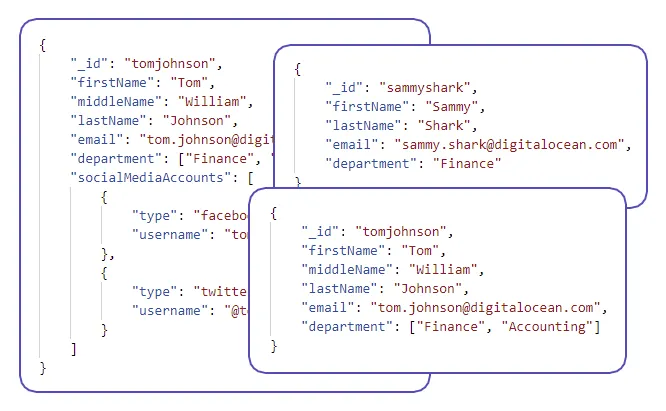
Consider an application where you’re storing complex, nested user profiles, product catalogs, or blog posts that vary in structure. Each object might have subfields, embedded lists, or optional sections. Trying to normalize this into relational tables would not only be tedious but also reduce flexibility and performance.
In this case, it’s recommended to use a document database. Systems like MongoDB Atlas or Amazon DocumentDB are purpose-built for storing and querying nested JSON objects. They support indexing on nested fields and let you query or update individual paths inside a document. If you’re already serverless or mobile-heavy, Firebase Firestore or Azure Cosmos DB might be a better fit.
Use Case: Relationship-based querying:
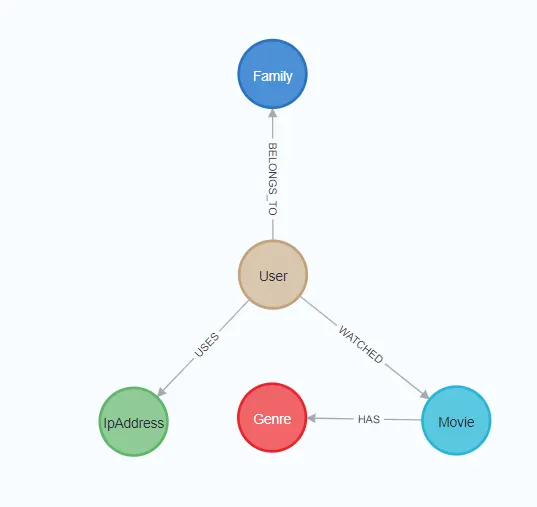
Now let’s imagine you’re working on a system where understanding relationships is key, maybe it’s a social network, a fraud detection tool, or a recommendation engine. Users expect the system to surface meaningful connections across entities: who knows whom, what interacts with what, or how things are related through multiple hops.
These workloads involve traversals, pattern matching, and recursive relationships, operations that traditional relational databases often struggle to express or optimize.
In this case, it’s recommended to use a purpose-built graph database. Neo4j, Amazon Neptune, and Azure Cosmos DB (with Gremlin API) are well-suited for modeling and querying complex, interconnected data. They can also power recommendation engines, identity resolution tools, and knowledge graphs with real-time performance.
Use Case: Keyword-based text search:
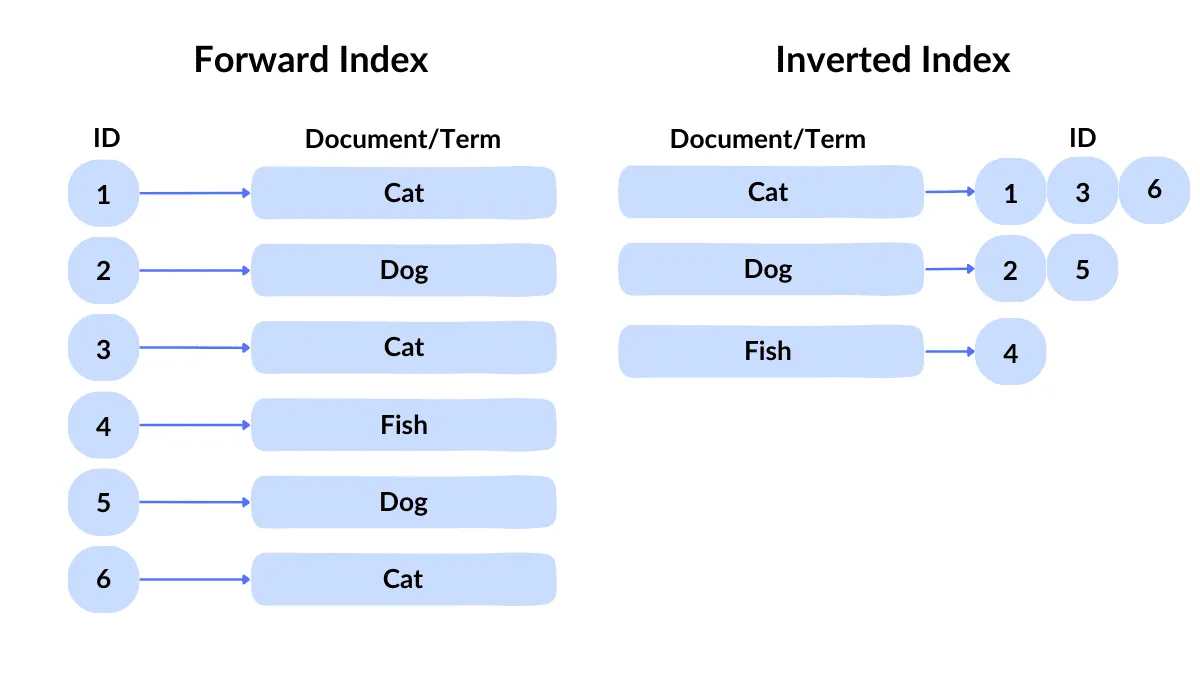
Now let’s imagine you’re working on a search experience, maybe for a news website, an internal tool, or a product catalog. Users expect to find what they need quickly, even if they mistype something or use synonyms.
These workloads involve fuzzy matching, ranking, tokenization, and stemming — all operations that typical databases don’t handle efficiently.
In this case, it’s recommended to use a dedicated search engine. Elasticsearch, Amazon OpenSearch, and Azure Cognitive Search are well-suited for full-text indexing. They can also power advanced filtering and faceted search interfaces.
If You’re Dealing with Unstructured Data :
Use Case: File and Media Storage
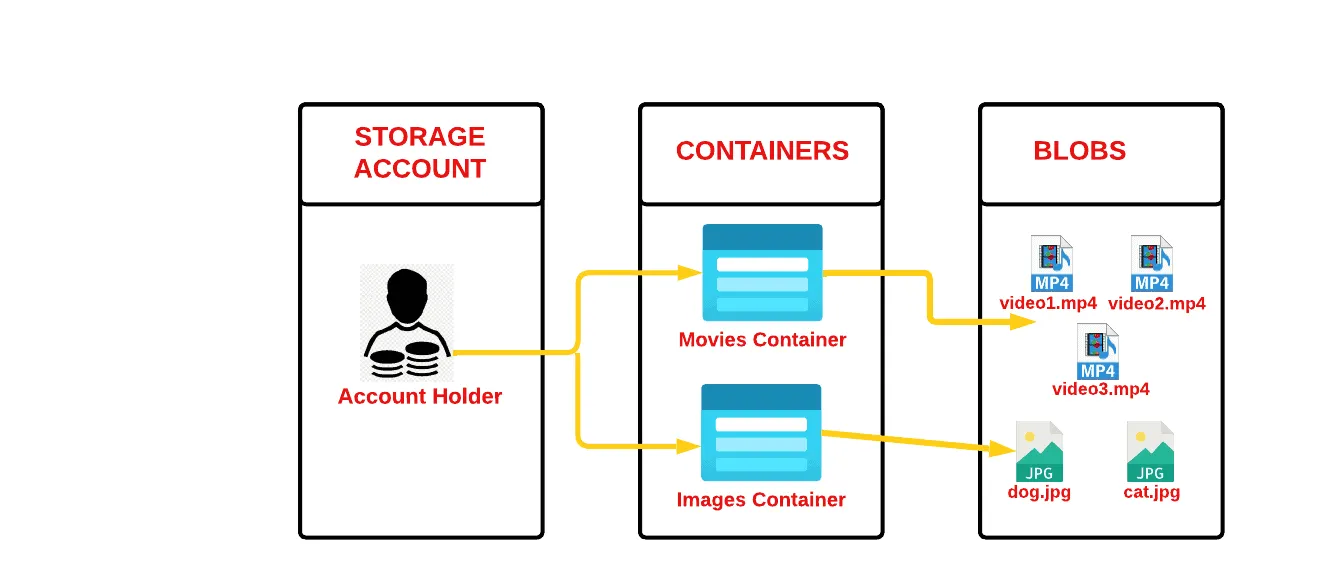
Suppose you’re building a platform that lets users upload profile photos, download PDFs, or stream video and audio. These files don’t need to be interpreted by a database — they just need to be stored, versioned, and served efficiently.
Think of a learning platform hosting lecture videos, or an HR system storing CVs and scanned contracts. You’re not querying the contents directly, you just want a reliable way to store and retrieve the files.
In this case, it’s recommended to use object storage. Services like Amazon S3, Azure Blob Storage, and Google Cloud Storage are optimized for durability, availability, and low-cost archival. They also support metadata tagging, version control, and lifecycle policies. Most modern SaaS platforms rely on object storage behind the scenes to manage files at scale.
Use Case: Large-Scale Text Analysis and Embedding
Now imagine you have thousands of documents — emails, customer reviews, support tickets, or legal contracts — and you want to search, classify, or summarize them. These aren’t nicely structured fields; they’re raw text, often messy and long.
Let’s say your product team wants to analyze sentiment from open-ended feedback, or legal wants to extract entities from scanned documents. This requires semantic understanding, keyword extraction, and often vector search.
In this case, it’s recommended to preprocess the data into embeddings and store them in a vector database. Tools like Pinecone, Weaviate, Qdrant support fast similarity search based on meaning rather than keywords. This is the foundation of AI-enhanced search, recommendation engines, and retrieval-augmented generation (RAG) for LLMs.
Use Case: Data Lake for Large-Scale Analytics:
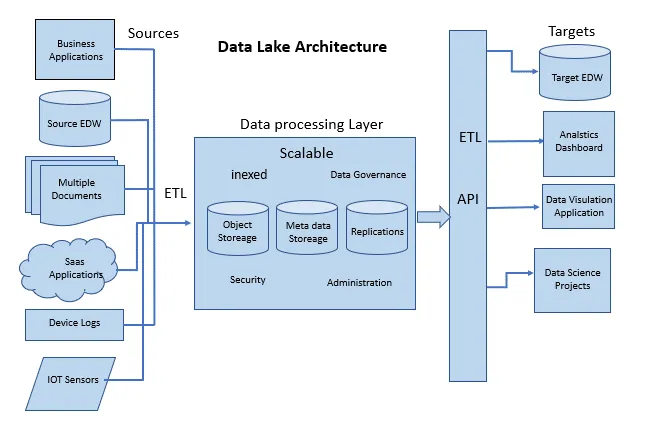
If you’re storing massive volumes of raw, unstructured data — like logs, images, audio files, or telemetry streams — and want the flexibility to analyze it later, you’re in data lake territory.
This is different from basic object storage. While object stores like S3 or Azure Blob are great for storing files, a data lake layers on metadata, cataloging, and schema-on-read features, so you can query and process that data at scale.
Think of use cases like a retailer collecting clickstream data, or a utility company storing IoT sensor feeds. In this case, it’s recommended to use a data lake engine such as Databricks, Delta Lake, or Snowflake, especially if you’re planning downstream analytics, ML workflows, or need compliance features like audit logs and fine-grained access control.
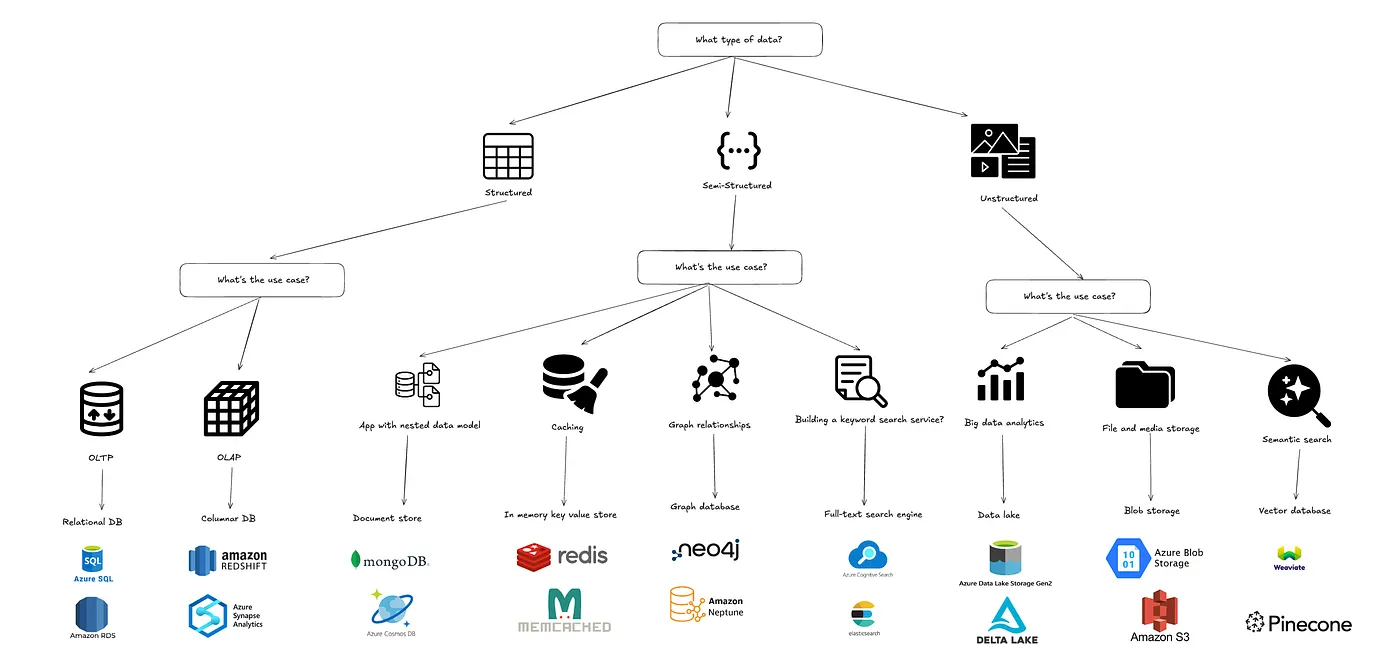
Summary flowchart:
Conclusion:
There’s no one-size-fits-all storage. It all comes down to how your data looks and how you plan to use it.
Match your storage to the shape and velocity of your data, and you’ll avoid both overengineering and costly bottlenecks.
Thank you for reading, and hope this article has been insightful and useful to you.